Two-phase QA for metric algorithms and app behaviour

Yingchen Liu
How I designed a two-phase quality process: AxLib focuses scarce domain-expert time on production-sample evidence and version differences, then SBN Testing lets app testers validate exact-build behaviour without rechecking the maths. Developers fix reported bugs while that testing continues, instead of waiting for a finished pass to be handed over.
- Quality architecture
- Production sampling
- Team workflow
01
What a metric algorithm is—and why app testing is not enough
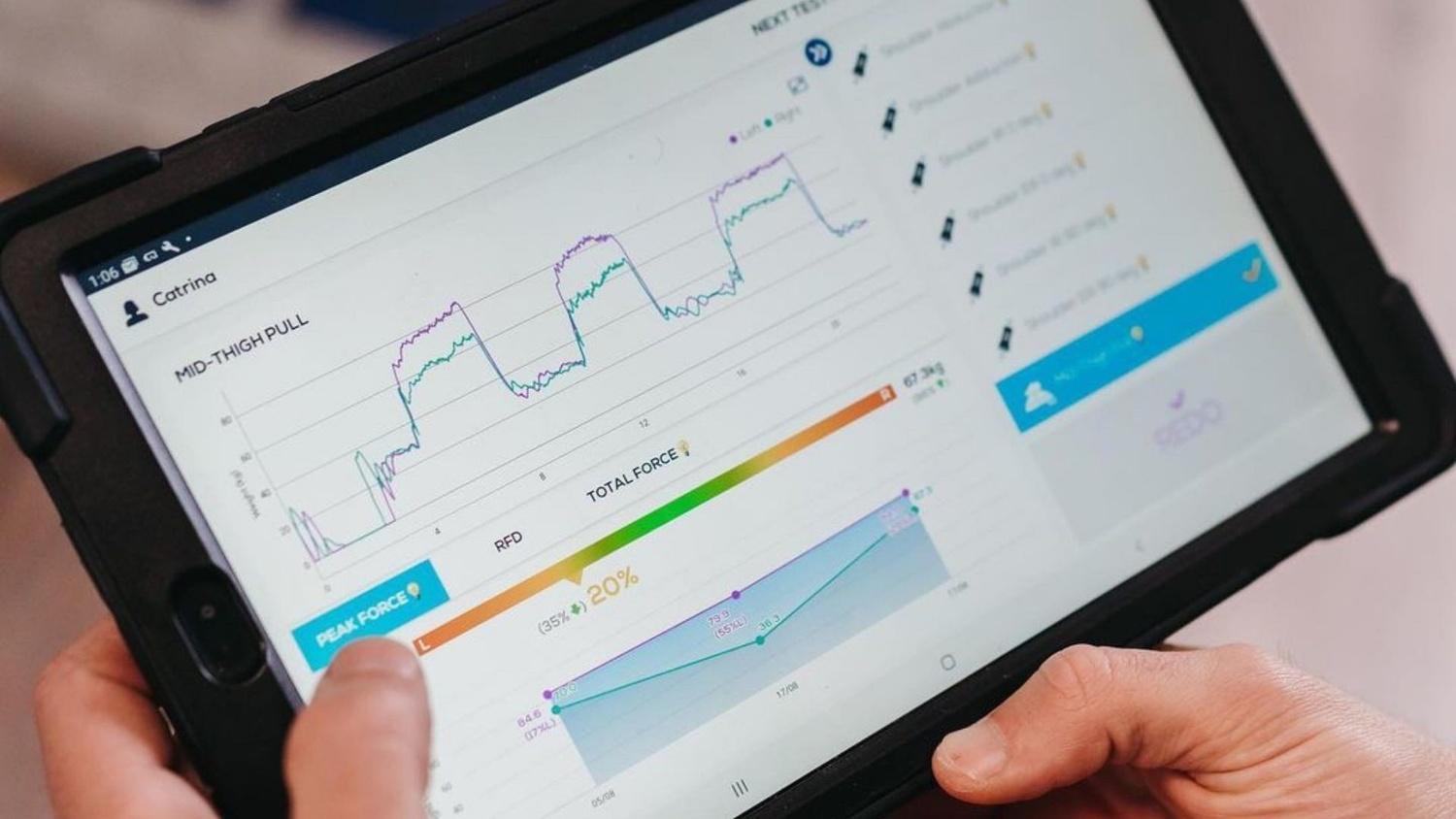
AxIT is a connected strength-assessment app. A practitioner runs a test with Push-IT, Pull-IT or Stomp-IT hardware, and the app shows live force, calculated results and reports.
AxIT records a force trace: a time-ordered stream of measurements from that hardware. A metric algorithm turns that raw curve into a result a practitioner can use, such as peak force, rate of force development, impulse, bodyweight-relative force or a left-versus-right comparison. The number depends on more than a formula: test type, sampling frequency, detected movement phases, device capability, units and algorithm version all affect the outcome.
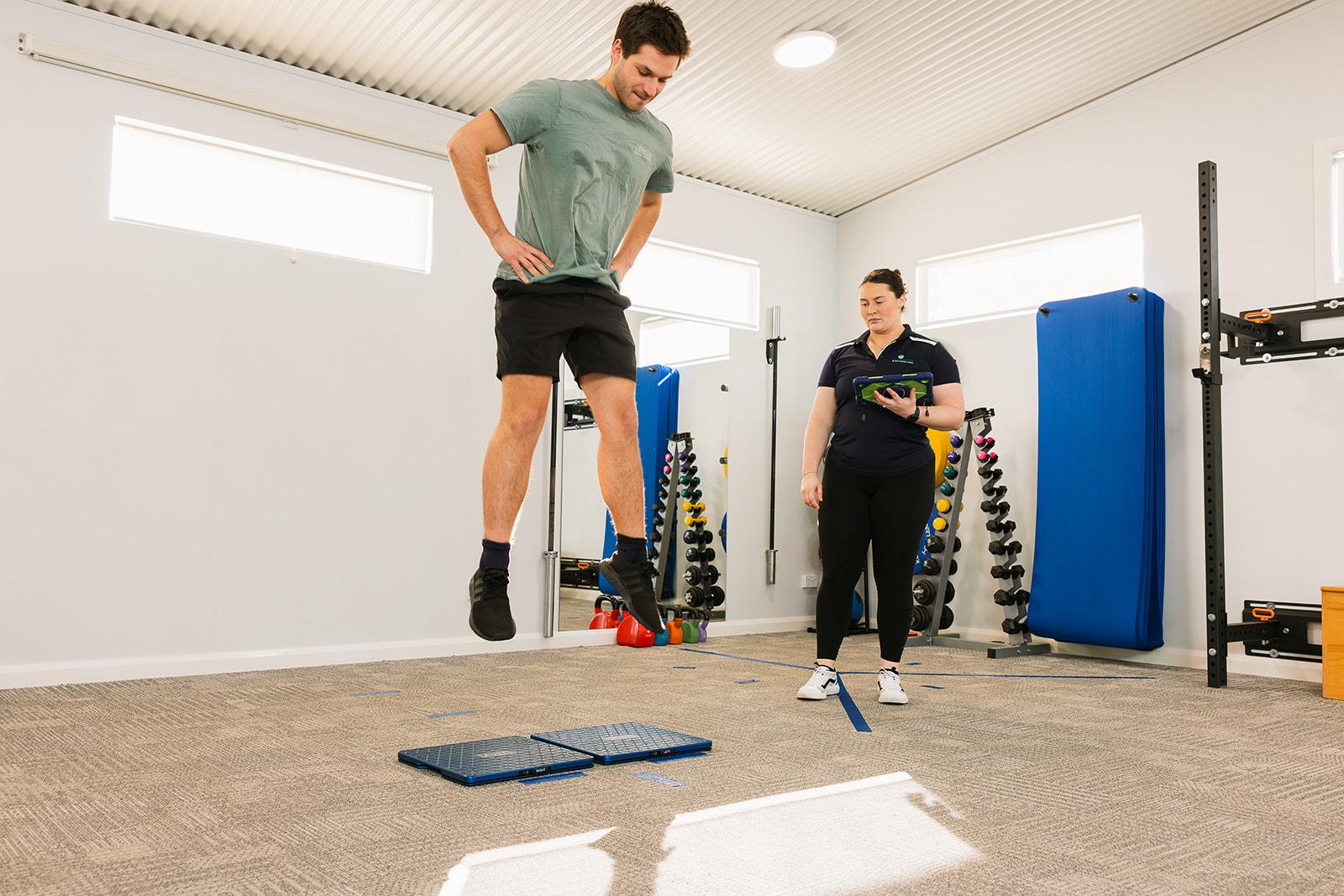
That creates two different kinds of quality question. A domain expert must decide whether the algorithm interprets the movement and force curve correctly. An app tester must decide whether an approved result appears, saves, synchronises and reopens correctly in a particular build. One person rarely has the time and expertise to answer both at scale.
02
The problem
Metric QA had an ownership mismatch. App testers were good at finding product problems, but they could not reasonably be expected to understand every force-trace algorithm, sampling rule or clinical interpretation. The people who did have that domain expertise had limited time and could not manually inspect every trace and every app build.
The old question—‘does the metric work?’—was too broad. It mixed two very different risks: whether the calculation was correct, and whether an approved calculation had been integrated into the product correctly. Asking one group to answer both questions either wasted expert time or pushed algorithm decisions onto testers without the right context.
As a startup, we do not have full-time testers. Anyone in the company can be a tester, and they usually do that testing around their own job.
03
One quality system, two different questions
Architecture
Phase 1 checks the calculation on recorded tests, before it enters the app. Phase 2 checks that one exact build shows the approved result.
Phase 1
Is the calculation right?
In AxLib, before the calculation goes into the app. The tests are real recordings with personal details removed.
- 01
Write the new calculation
Engineers build it in AxLib, where the inputs and the result can be checked.
- 02
Replay a sample of saved tests
When a person is tested, the app saves how their force changed over time and removes their personal details. This check reruns the new calculation on about 1 in 100 of the saved recordings it includes. The sample shows how the calculation behaves on real tests. It does not look at every test the app has saved.
- 03
Compare it with the current one
Show how often each succeeds, which old failures come back, and which good results are lost.
- 04
An expert decides
A domain expert approves or rejects what changed. Finishing the run is not the decision.
Phase 2
Does the app show that result?
In SBN Testing, after the approved calculation is in one exact build. Testers leave the maths to phase 1.
- 01
Testers check what a person can see
On that build, the result appears, saves, syncs and opens again.
- 02
Developers fix bugs while testing continues
A failed case can be fixed immediately. The remaining tests keep going.
The two-phase quality model
I split the process at the point where the required expertise changes. Phase one happens in AxLib before app integration: engineers replay a candidate against de-identified production traces, compare it with the baseline and prepare the changed or uncertain cases for domain review. Phase two begins after that calculation is accepted and integrated: app testers verify observable behaviour in one exact build through SBN Testing.
To see how a new calculation behaves on real clinic work, each check reruns it on about 1 in 100 of the saved force recordings it includes. Personal details are already removed. That is a sample plan, not a review of every test the app has saved. Each run keeps the exact number of recordings used, which recordings were left out, which version of the calculation ran, and the outcomes, so a reviewer can see what the sample covers.
Phase 1: make scarce domain expertise scale
I designed AxLib as both a development environment and a calculation-review system. Each candidate runs against frozen, de-identified traces without replacing the baseline. The comparison records the input identity, algorithm identity, metric values, units, calculation status and intermediate evidence needed to explain why a result changed.
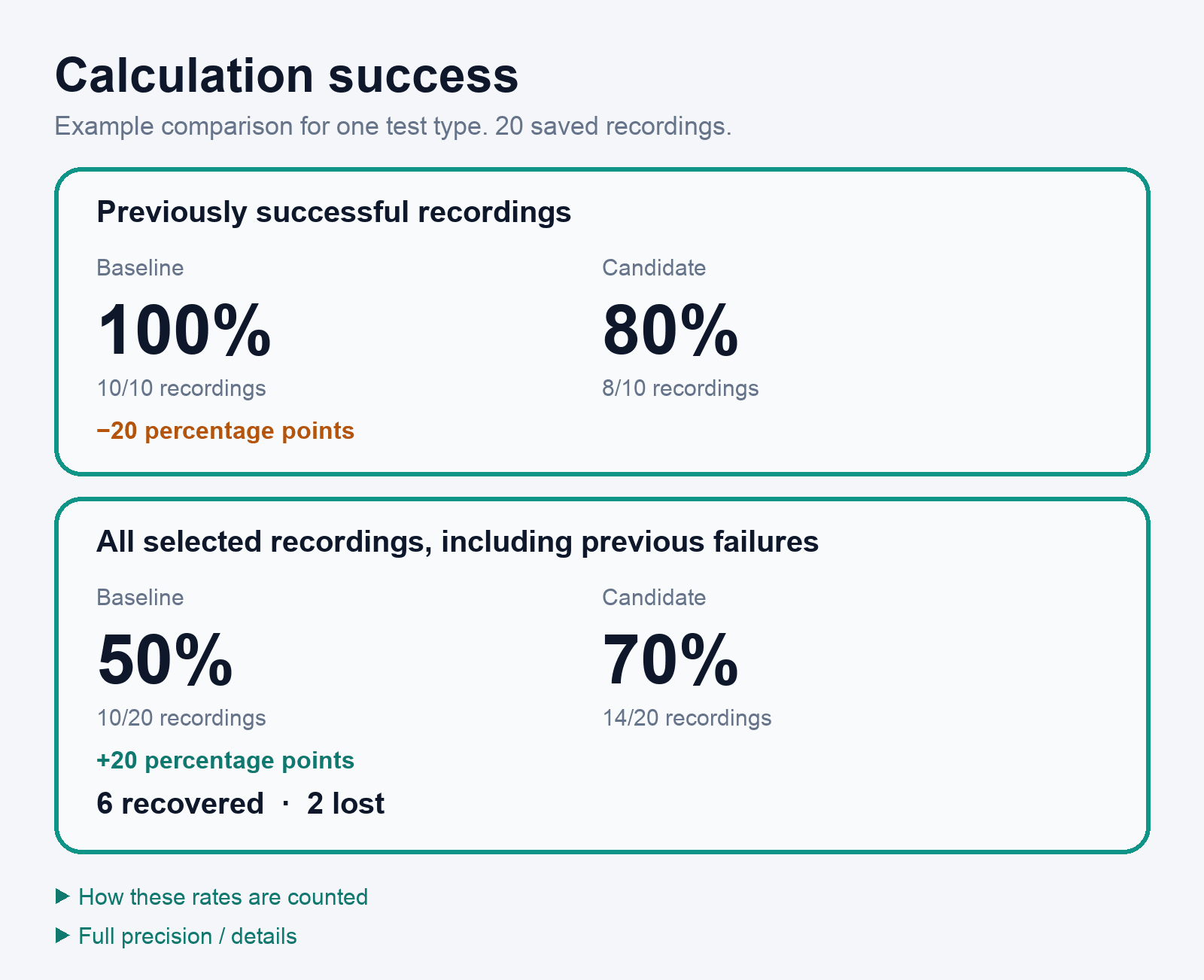
The important measure is not only ‘did the code run?’ AxLib calculates baseline and candidate success rates over the selected production cohort and surfaces recovered, lost, changed, unchanged and unavailable outcomes. Domain experts can then spend their time on the delta: the cases where behaviour changed, evidence is ambiguous or the calculation needs a judgement only they can make. This is possible because those calculations come from one shared metrics Kotlin Multiplatform project.
Version comparisons remain reviewable and append-only. A later candidate can improve the algorithm without rewriting the evidence used to approve an earlier one, and disagreement can be recorded as correct, incorrect, uncertain or still unreviewed instead of being compressed into a misleading green status.
AxLib · Did the calculation succeed?
This is an example, drawn so the numbers stay sharp. Of 10 recordings the current calculation already got right, the new one keeps 8: 100% versus 80%. Across all 20 recordings, success moves from 50% (10/20) to 70% (14/20). Six old failures come back, and two good results are lost.
AxLib · Where the expert should look
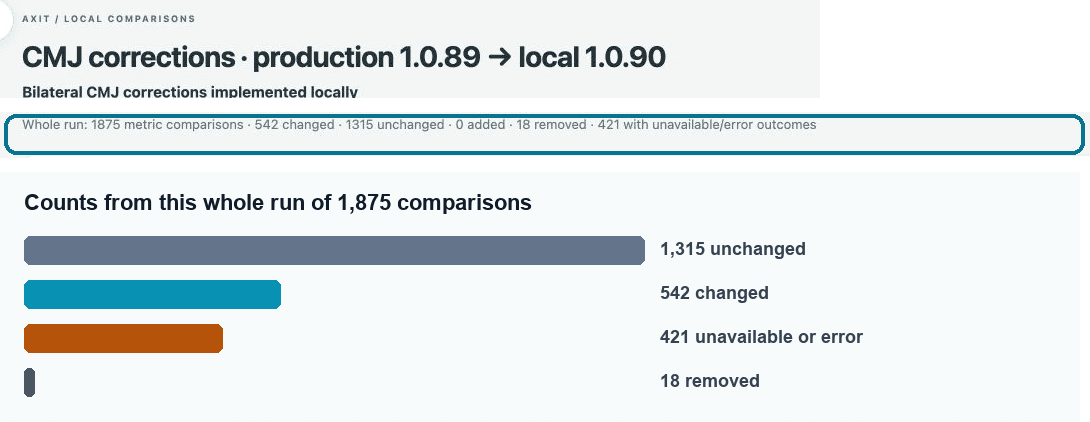
This whole run compared 1,875 results. 1,315 stayed the same and 542 changed. 18 were removed, none were added, and 421 were unavailable or an error. The bars repeat those counts separately. The 421 unavailable or error results overlap the other counts, so they are not stacked into one total. The expert reviews the 542 that changed, not the 1,315 that stayed the same.
Phase 2: test the product, not the formula
Once an algorithm has passed the first phase and is integrated into the app, SBN Testing gives testers a smaller, clearer responsibility: verify what a user can observe. That includes metric availability, names, phases, units, selections, save and reopen behaviour, synchronisation and the feature-flag combinations that control the experience. They do not need to re-derive the maths.
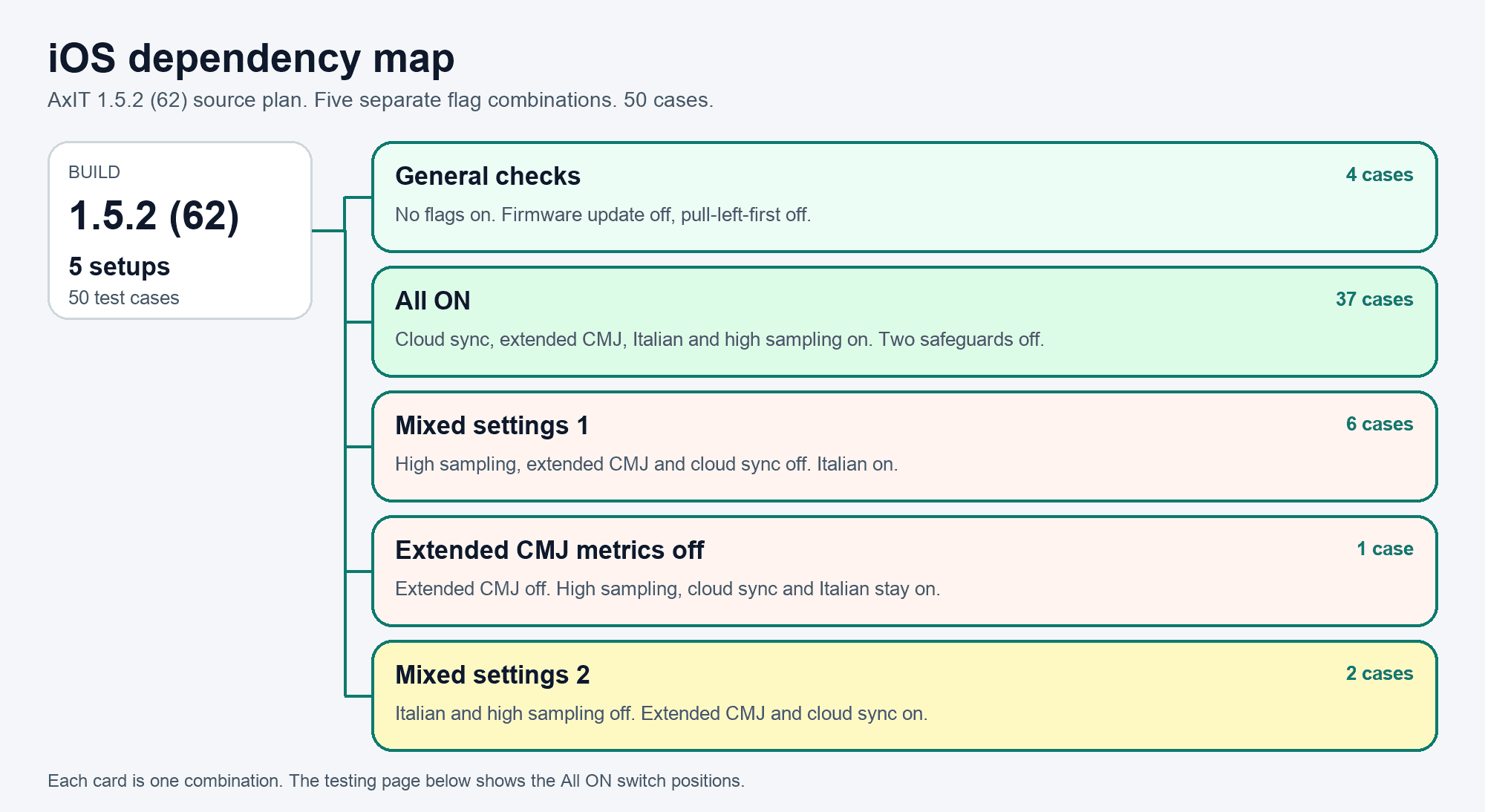
The dependency map is where a tester reads that relationship for one exact build: the flag combination first, then the features and suites that combination covers. Progress is shared live, results retain their evidence and history, and the same case can be picked up in a short pocket of time without losing who tested what. This turns fragmented availability into useful parallel work instead of duplicated or context-free checks.
The steps stay easy to follow when a screen is unfamiliar or new. Hovering a named screen or button in a step opens a popover with that step’s reference screenshot, so the tester can see the part of the app the instruction means without leaving the case. The same preview opens from the keyboard or a tap. A step with no screenshot stays ordinary text.
Feedback stays close to the evidence. A tester can mark a case Passed, Failed, Blocked or Don’t understand, attach a screenshot and start a discussion on that exact result. Questions and replies can optionally notify the relevant people in Slack with a protected link back to the build and case; the durable conversation remains in SBN Testing rather than being lost in chat.
That live record also removes the wait between testing and fixing. A developer does not sit idle until the whole pass is finished and handed over as a batch. As soon as a case fails, the exact build, configuration, screenshot and discussion are already attached, so the developer can start the fix while testers continue the remaining cases. The overlap cuts the time between finding a defect and correcting it.
SBN Testing · Different setups on one build
The 1.5.2 (62) source plan keeps contradictory flags in separate setups, 50 cases in all. General checks only holds firmware update and pull-left-first off. All ON turns on cloud sync, extended CMJ metrics, Italian and high sampling. Mixed settings 1 turns high sampling, extended CMJ and cloud sync off, and leaves Italian on. Another setup turns extended CMJ off while high sampling stays on. Mixed settings 2 turns Italian and high sampling off. The image below shows the All ON positions on the testing page.
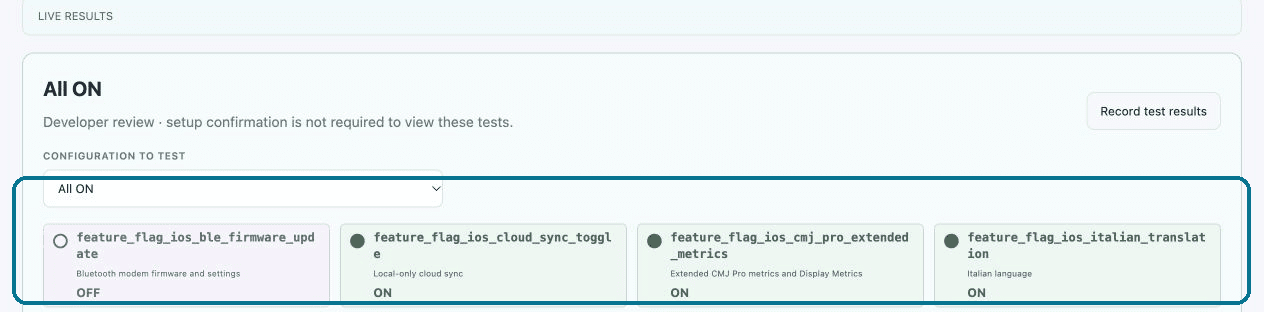
SBN Testing · All ON on the testing page
All ON is one of the setups above. The outlined chips are its positions on the testing page: Bluetooth firmware update off, cloud sync on, extended CMJ metrics on, and Italian on. A tester confirms those positions, then checks what the app shows. Developer review can open the tests without confirming that setup.
Feature flags, and the map of what they turn on
I introduced a typed feature-flag contract for AxIT iOS. Every flag is one Boolean, named feature_flag_ios_<name>, registered in a single catalogue and backed by Firebase Remote Config. New product behaviour defaults to off. While it is off, its entry points and side effects stay out of the product. Turning it on reveals that behaviour in the build already installed, so testers compare the two states without waiting for a second binary. If Remote Config is missing or the fetch fails, a new flag stays off rather than turning itself on.
That removed a release wait. The implementation can travel inside the exact build under test while users still see the previous behaviour. Enabling it for testers is a flag change and a relaunch, not another app. The rest of the pass can continue on that same build with the new behaviour still hidden.
The dependency map stops the combinations from becoming guesswork. It does not ask anyone to try every on/off permutation. For one exact build it groups cases that can share a setup. All ON turns on the flags under test and still lists the safeguards that must stay off. Cases that need contradictory settings stay in separate configurations. Each configuration is drawn through to the features and suites that depend on it, so a tester sees both the switch positions and the product behaviour those positions cover. Choosing a configuration never changes the flags on the device. It tells the tester what to set, and then what to confirm, before the related features are tested.
Switching to tests that need a different combination does not keep the previous setup. SBN Testing clears that confirmation and asks the tester to check the required on and off positions, then click to confirm them, before those cases open. The click records that the tester checked the app. It does not change the flags. If a later step itself changes a flag, the steps after it stay closed until that change is checked and confirmed too, so the pass cannot continue on the wrong setting.
04
The decisions that shaped the system
- 01
Spend expert time on the differences
Domain experts should compare baseline and candidate outputs, investigate regressions and approve changed calculations—not repeat every app test. This is possible because those calculations come from one shared metrics Kotlin Multiplatform project.
- 02
Don't stop because the code ran
Replay the new calculation on recorded production tests, with personal details removed. Show how often it succeeds, which old failures it recovers, and which good results it loses.
- 03
Make small windows of testing useful
Exact-build dependencies, live progress, durable evidence and Slack-linked questions let testers contribute safely in short, fragmented sessions.
- 04
Fix bugs while testing continues
A developer starts from a failed case as soon as it is reported. Testing of the remaining cases does not stop, and development does not wait for the whole pass to be handed over.
05
What improved
The team gained a traceable route from algorithm development to app acceptance without asking every participant to become a domain expert. Experts review a bounded comparison instead of an entire release; testers work from visible dependencies and exact-build context; engineers receive evidence-linked failures while testing is still underway and can fix them without waiting for a completed hand-off; and release owners can see what is approved, what is tested and what remains unproven.
06
What I learned
The biggest lesson was that QA scales through responsibility design, not only more automation. A trustworthy system sends each question to the person qualified to answer it, preserves the hand-off between phases and makes incomplete evidence visible. That is more valuable than a single pass percentage that hides how the decision was reached.
Takeaways
- Use production-sample success rates and version comparisons to focus scarce expert review.
- Separate algorithm approval from observable app-behaviour QA.
- Design testing around exact dependencies, short work sessions and durable feedback.
- Let developers fix reported bugs while testers continue, instead of waiting for the whole pass to be handed over.