Designing Mapify’s automatic affiliate settlement

Yingchen Liu
Affiliate settlement used to be a shared Excel sheet. I replaced it with four records and a job that settles a paid invoice after seven days, unless a staff member has already changed it.
- Payments
- Affiliates
- Operations

01
Settlement used to be a spreadsheet
Mapify is an AI app that turns documents, videos, recordings and web pages into visual mind maps.
A partner shares Mapify and earns commission when someone they refer pays with that partner’s coupon. The amount depends on the agreement, the discount, and the invoice.
The team calculated that in Excel. I replaced the sheet with records and an automatic settlement, so the same invoice produces the same amount without someone retyping it.
02
The problem
Affiliate settlement was a shared Excel sheet. It held the partner, the coupon, the discount, the commission rate, and a list of invoices someone had marked as paid. More than one person edited it. A second agreement for the same partner, a discounted invoice, or an invoice that arrived just after a coupon ended was easy to put on the wrong row, and the sheet did not record why a number had changed.
The requirement was a system that could answer the same questions without a spreadsheet. Who is the partner? What was agreed: the coupon, the customer’s discount, the commission rate, who pays the fees, and the dates? Which paid invoice belongs to that agreement? Is that invoice still waiting, settled, or paid?
The amount should not be treated as settled on the day the customer pays. It should wait, then settle on its own. A staff member still needs to correct a status, and that correction has to survive the next automatic run.
03
From a spreadsheet to a settlement record
Architecture
The sheet had to name the partner, the agreement and the invoice. The system stores those as records and settles the invoice on its own.
The requirement
What did the spreadsheet have to answer?
Every payment the team typed into Excel was an answer to one of these.
- 01
Who is the partner?
Name, email, country, channel, who manages the account, and how they are paid.
- 02
What did we agree?
The coupon, the customer’s discount, the commission rate, who pays the fees, and the start and end dates.
- 03
Which invoice counts?
The invoice that used the coupon, the discount on it, and whether that payment had already been settled.
The system
What does automatic settlement do?
The records answer the same questions, and a job moves the status.
- 01
Attach the invoice to the agreement
A paid invoice that uses the coupon is stored against that agreement, starting as pending.
- 02
Wait seven days, then settle
The job marks pending invoices completed. It runs one batch at a time, and only one server runs it.
- 03
Leave a staff change alone
If a person has changed the status, the job skips that invoice. The change is kept in the history.
How the settlement runs
When Stripe reports a paid invoice that used a coupon, the backend finds the agreement for that coupon and writes the invoice as pending. An invoice up to seven days after the coupon ends is still attached to that agreement, so a trial that bills just late is not dropped between two agreements. The discount Stripe applied is stored on the invoice. Commission uses the total excluding tax.
The settlement job wakes on a schedule. It takes a short lock, so a second server does not settle the same invoices. It selects pending invoices older than seven days that a staff member has not changed, and marks them completed in batches of 100. A staff change from the dashboard is stored with the person’s identity. The partner’s own view hides invoices whose commission is zero, and shows only the last digits of the invoice id.
The data model
The four records are the model the job and the dashboard both read. The partner is the account. The agreement is the coupon and the rates. The paid invoice is one Stripe charge attached to one agreement. The status history is the audit of pending, completed and paid, and of who moved it.
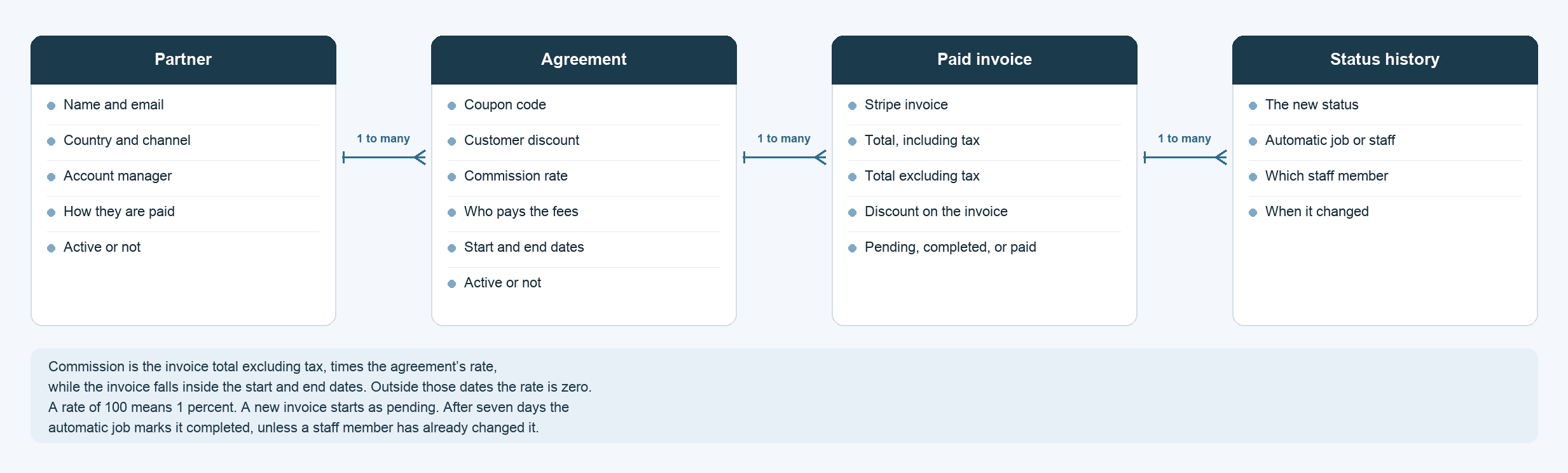
The four records that replaced the spreadsheet
A partner has many agreements. An agreement has many paid invoices. Each invoice keeps a history of its status. Commission is calculated from the invoice and the agreement, not typed into a cell.
04
The decision
I split the sheet into four records. A partner has many agreements. An agreement has many paid invoices. Each invoice has a history of status changes. Commission is not typed in. It is the invoice total excluding tax, times the agreement’s rate, while the invoice falls inside the start and end dates. Outside those dates the rate is zero. A stored rate of 100 means 1 percent.
A new invoice starts as pending. Seven days later an automatic job marks it completed. If a staff member has already changed that invoice, the job leaves it. Staff can then mark a completed invoice paid. Every change records whether it came from the job or from a person.
The decisions that shaped the system
- 01
Keep the partner, the agreement and the invoice apart
A partner can have more than one agreement. Each paid invoice belongs to one agreement, and the commission is calculated from that pair.
- 02
Use the amount excluding tax
Commission is the invoice total excluding tax, times the agreement’s rate, and only while the invoice falls inside the agreement dates.
- 03
Settle after seven days
A new invoice waits as pending. An automatic job then marks it completed, unless a staff member has already changed the status.
05
What improved
Operations no longer settle the programme from a spreadsheet. A paid invoice is attached to the agreement that owns the coupon, the commission follows the rate and the dates, and seven days later the invoice is settled unless someone has already changed it. The history shows whether the job or a person made that change.
06
What I learned
The spreadsheet was the requirements list. Each column that people had to retype became a field, and each argument about a row became a relationship or a status. Automatic settlement is safe only when a person’s correction is stored separately and the job is told to leave it alone.
Takeaways
- Record the partner, the agreement and the invoice as separate records.
- Calculate commission from the tax-exclusive total and the rate, inside the agreement dates.
- Settle automatically after seven days, and keep a history when a person changes the status.